
Since starting ChamberForge in 2018, we've been constantly asked "How can we add referrals or 1-to-1s with guests?" Groups invite guests to meetings and it turns out that members do sinigificant number of referrals and 1-to-1s with guests. Our response was you can create a fake user called "Guest" and report all guest activities with that user. It was a workaround and met the needs of groups but our team was not satisified with the approach. There needed to be a better and more permanent solution.
You can now report activities with guests. Our awesome development team worked hard for the past year to make ChamberForge platform more flexible such that you and your members can report referrals and 1-to-1s with guests without guests having to create an account. This flexibility is what makes ChamberForge the number one referral tracking platform for business-to-business referrals in the world.
So how does it work?
When you go to Send a referral, you were only able to see members of your group or your personal connections. Now, you will see guests from your group in the dropdown. Just select the guest you did activity with - referral or 1-to-1 - and you can report it to your group just like with any other members.
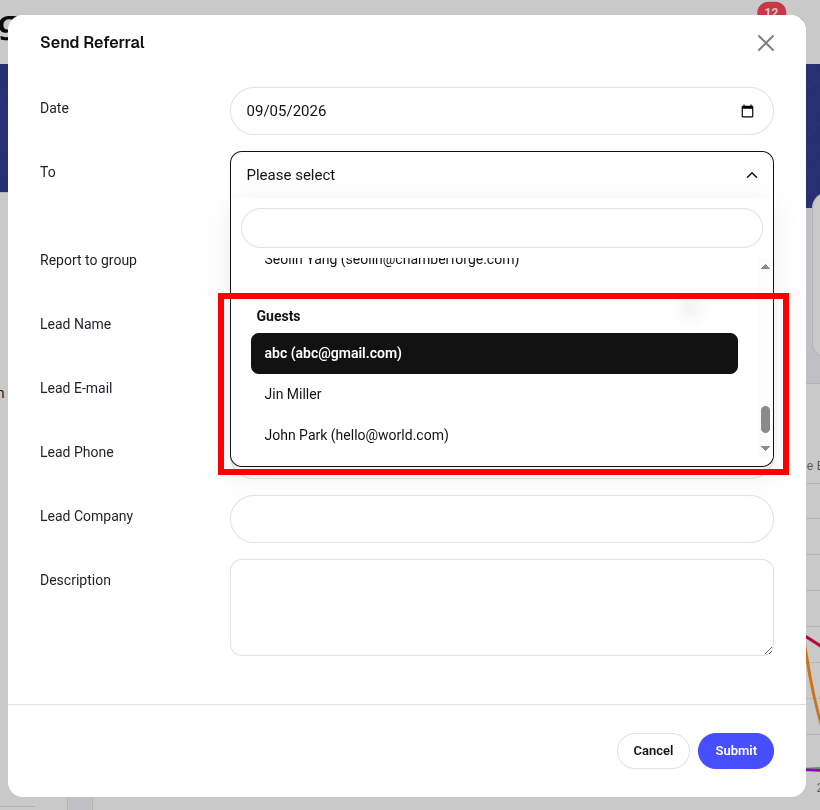
While you can continue using a placeholder account "guests", if you want to accurately capture how guests are doing business with members, I recommend that you use the actual guest instead of a placeholder user. We plan to add additional reports that show various numbers and metrics showing activities between members and guests.
Have fun referring!